

Trading is the exchange of gold and items between players. Trading is one of RuneScape's oldest features and while not essential to game play, it plays a large part in the community and is utilised by nearly every player. For free players there is a 25k trade limit per hour, becoming a member will remove it permanently (if you return to F2P you will not have the limit again).
How to trade[]
The trading process is relatively simple and divided into 3 steps:
- Initiating the trade - Where one chooses their desired partner
- The first trade window - Where one makes their offer of the items to be traded
- The second trade window - Where the player is given one final chance to make sure they want to go through with the trade
Players must be wary, as there is no way to undo a trade; any transaction is final.
Initiating a trade[]
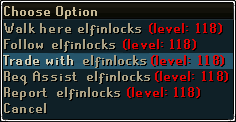
The trade context menu
To trade with someone, a player must right-click the person and select the "Trade with" option. The message "Sending trade offer..." will appear in the chat box, and "[player name] wishes to trade with you" will appear in the other player's chat box. That person must then accept the invitation by clicking on that message. If the offer is accepted, a trade window will open for each player.
However, if one of the traders has a certain interface up, such as bank, equipment stats, or trading interface with another player, "The other player is busy at the moment." message will show up in the chatbox.
Players in a busy world who wish to see the trading messages text may click on the "Trade and Assistance" chat tab at the bottom of the screen. This allows the player to see only the trade requests and game messages.
First trade window[]
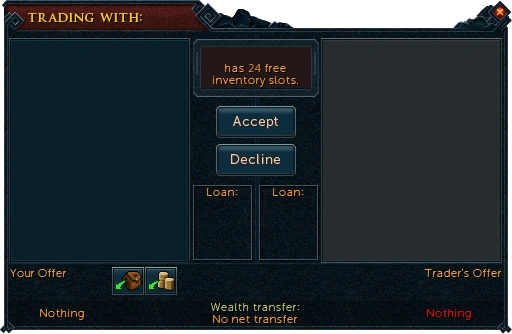
The first trading window
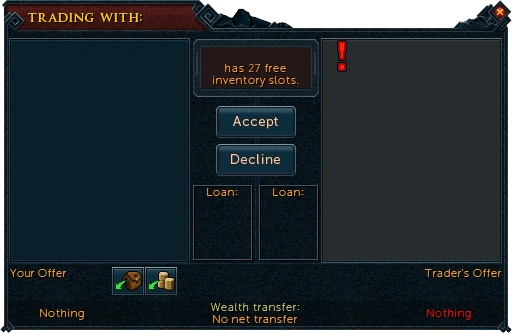
A trade modified by other player
The trade window has three main parts:
- Your Offer - to add to a trade offer, click on an item in their inventory; to remove an already added offer, click the item. Players may trade with both what is in their inventory and their money pouch.
- The backpack icon allows the player to offer everything that can be traded from the backpack
- The money icon allows the player to offer a user-entered amount of coins from the money pouch
- Trader's Offer - other player's trade offer
- Wealth transfer scale - calculates the values of all the items using Grand Exchange price as an indicator and then shows if the trade is balanced or positive to one or another player. Note if the value of items shown is too great, then a message is displayed instead
Upon entering the trade window, items gain a new right click menu consisting of the following options:
- Add-1, Add-5, Add-10 Adds that amount of the item to the player's offer
- Add-X The player is prompted to enter a number which will be the amount of the item to be added; one may use "K" for 1,000 and "M" for 1,000,000.
- Add-All Adds all of the item to the player's offer
- Value Displays in the in-game chat window the current Grand Exchange market value of the item.
- Lend Allows the player to temporarily loan another player the item assuming:
- The player is not currently lending an item
- The other player is not currently borrowing an item
- The item in question is applicable to the lendable items list
- Examine retains the same function as normal, displaying text to describe the item.
If an item is removed from an offer, a big red flashing exclamation point will appear where the item used to be with a message noting to check the offer. If the player attempts to accept the offer, they will be given a warning to double check the offer.
There is also an indicator showing the amount of free inventory slots the other player has left, as well as an accept and decline button. Once either player is satisfied with the trade, "Accept" must be clicked to proceed. When both players have done so, the second trade window appears. If a player does not wish to trade with the other anymore, "Decline" may be clicked to close the trade window.
Second trade window[]
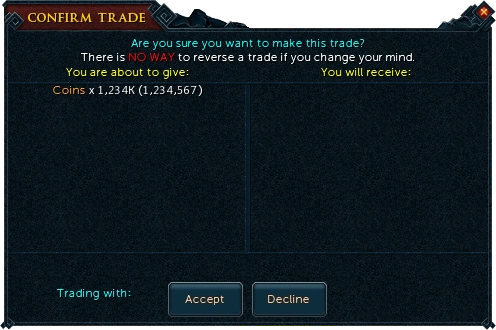
Second confirmation window
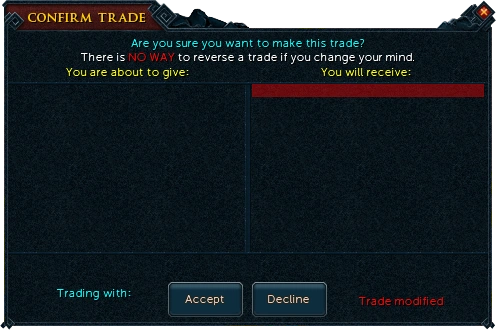
A trade modified by other player seen in the second confirmation window
The second window is a final confirmation of the transaction; no actual offering of items will take place in this window. Here players are able to review which items have been offered by each party to confirm they are trading what they intended to. Numbers are more specific in these trade window; e.g. if a player offers 1,234,567 coins in the first window, it will only display as a 1,234K. In the second window however, the full value is shown and the player will see that 1,234,567 coins are being offered.
Any items modified from the first window will still be marked in red, this time with a bar that spans the length of the entire half of the other player's window.
Once both players have checked the items of trade and are satisfied, "Accept" must be clicked to finalize the trade. When both players have done so, the trade is confirmed and both players will be notified with the "Accepted trade." message.
Declined trades[]
As of 4 January 2012, when the player's trading partner declines the trade or performs some other action that has them exit the trading screen, the player will be notified with the "Other player declined trade!" message. This change was made in response to ongoing scams.
Trading worlds and locations[]
The Grand Exchange is the most populated place to trade with other players, even if face-to-face trading has become less frequent after the introduction of the Grand Exchange in 2007.
There are also official trading worlds:
- Free worlds
- 3
- Member worlds
- 2
- 1
Tradeability[]
Not every item in RuneScape is tradeable, and of the items that are, not every tradeable item is tradeable on the Grand Exchange. In general, most tradeable items are tradeable on the Grand Exchange, however. The most common exception to this rule is coins. In general, almost every tradeable item has a "drop" option rather than a destroy option and will display itself on the ground. Exceptions exist (such as implings in jars).
Trivially, any tradeable item may be offered to another player via the trade screen and this may be the only way to get items not available on the Grand Exchange.
Trivia[]
- When the net exchange of a trade experiences an overflow error by exceeding 2,147,483,647 coins, the wealth transfer is displayed as "Unknown".


